
TCL’s Nxtpaper 4.0 screen: A review

When we buy an electronic device, the normal thing (I want to believe) is to choose the most balanced model within the price range available to the purchase.
Let's take a phone as an example. There's no point in having the best camera in the world if the system crashes or the battery can't keep up with your routine. Or a computer that has a wonderful keyboard but a terrible screen.
Last December, I bought a tablet just because of its screen. The other specifications? I didn't even look at them. I wanted to see with my own eyes that screen, promised by the manufacturer as almost magical, combining the visual comfort of E-Ink screens with the speed and smoothness of LCD.
Today, I'll talk about it: TCL's Nxtpaper Tablet 11 gen. 2 and its Nxtpaper 4.0 screen.
I had been intrigued by TCL's Nxtpaper technology for a year. In a press release published in January 2025, the Chinese manufacturer claimed that this update, Nxtpaper 4.0, was “further optimized for human eyes” and that it redefines “standards in clarity, personalization, and versatility while prioritizing healthy habits and reducing impacts on long-term vision health.”
It would be silly of me to believe a company's marketing, of course. So I researched reviews and videos from people who do this for a living, “influencers” and tech journalists. And although the comments were less enthusiastic than those from TCL, the unanimous opinion was that Nxtpaper 4.0 was really different, more comfortable for the eyes.
Is that so?
***
My eyes are not the same as they were 20 years ago, but I can say with certainty that TCL's technology is not convincing. Or, at least, it didn't convince me.
The screen of the Tablet 11 gen. 2, the so-called Nxtpaper 4.0, is ~11 inches and has all the features touted by TCL: matte finish, paper-like texture, and “colored paper” and “ink paper” modes.
TCL suggests that in “ink paper” mode, the Nxtpaper 4.0 screen resembles that of the Kindle and other reading devices that use E-Ink screens. Similarly, “colored paper” mode removes color saturation, making it similar to Kaleido 3 screens, also from E-Ink, found on newer tablets and readers such as the Kindle Colorsoft.
This is… half true. Although TCL does not specify what this screen is made of, other sources point out that it is an IPS panel with NCVM coating, which stands for non-conductive vacuum metallization. It is this finish that gives Nxtpaper 4.0 the characteristics that set it apart from a regular LCD screen: texture, matte appearance, less glare and fewer fingerprints.
Is it cool? Yes, but none of this extra layer and software features can overcome the reality that it is an LCD screen. Worse still, every switch triggers an animation lasting a few seconds, during which time the tablet is unresponsive.
And a comparison of the three modes:

This would be disappointing, but okay, life goes on. However, the screen becomes a major negative point due to the relatively low resolution, at 1920×1200 pixels in a 10.95 inches real state. This combination results in a density of 207 pixels per inch (PPI).
This scores 21.8% lower than that established by Apple, back in the day, to classify an iPad screen as “Retina” (~264 PPI). It's more corporate gibberish, but this difference of a few dozen pixels per inch is noticeable even to my tired eyes. The TCL tablet screen looks slightly blurry. It's a minor detail, but the kind of detail that is constantly in front of your eyes — literally.

The screen on my old 2017 iPad Pro, even with lower brightness and edges “burned”, is more beautiful. (I noticed this burning effect on the edges when taking some photos for this post.) I don't know if it's “healthier” for the eyes, but I imagine that if you reduce the brightness, activate iPadOS’ Night Shift mode (which reduces blue light emission), and eliminate colors (in the accessibility settings), it becomes comparable to TCL's Nxtpaper 4.0. Even better, because of the higher resolution.
And the screen on the basic Kindle I've had since 2024, from E-Ink's Carta line, with 300 PPI, is less harsh on the eyes and more pleasant to read. In short, TCL's source of inspiration is much better than its attempt at copying it.

***
There are other physical characteristics that represent a downgrade in a tablet that I use only for reading. The screen ratio (16:10) makes it very narrow in portrait mode compared to the more square (4:3) iPad.
The major design flaw of the Tablet 11 gen. 2 is that the light sensor, which controls automatic brightness, is located next to the front camera, both on one of the long edges, which means that in portrait mode, the brightness gets out of control when I move my hand over the sensor to interact with the screen.
It's such an annoying issue that I disabled automatic brightness. Indoors, where I use the tablet, this drastic measure solves the problem. The screen brightness, which reaches 500 nits, is more than enough. I almost always use only 10% of the screen brightness power, which surprised me given reports that this type of screen tends to be darker. This does not seem to be the case here, perhaps one of the developments of version 4.0 of Nxtpaper technology, even though white does not look… white; it is more like that weird gray of E-Ink screens, an undesirable similarity.
I don't know if the brightness is sufficient outdoors, under strong sunlight. The crappy weather where I live (Curitiba, Brazil) prevented me from testing this. I doubt that 500 nits will be enough do handle sunlight, though.
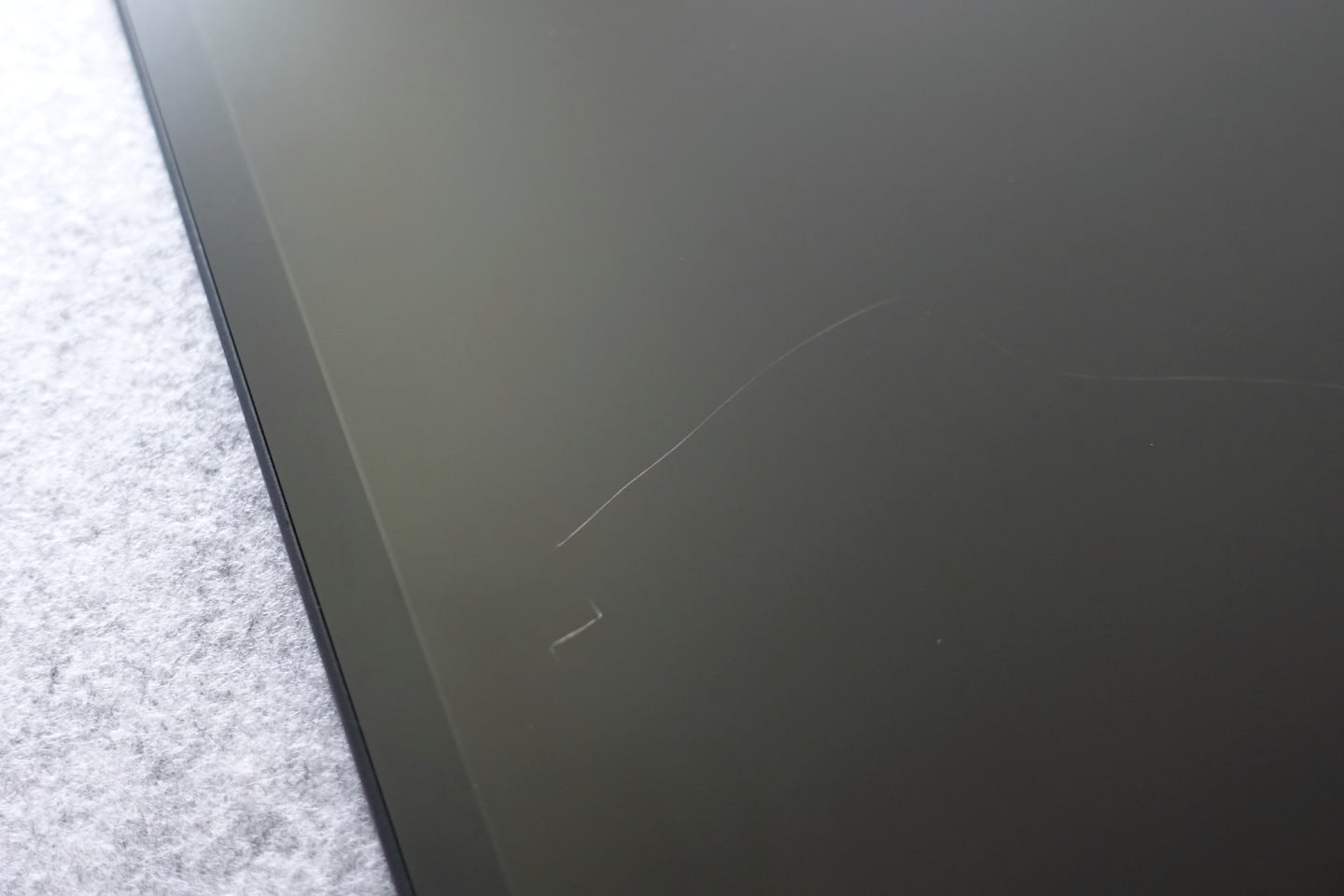
To conclude this long commentary on the Tablet 11 Gen. 2 screen, at some point in the last two months, on the short ~1-meter journey between the sofa and the sideboard where the tablet is kept when not in use, a visible scratch appeared on the screen. Neither the iPad nor the Kindle have scratches, even after years of use and exposure to more hostile scenarios, such as when I (always) leave one of them in my backpack without any cover or other type of protection. And note: the Kindle’s is made of plastic.
***
The tablet itself has pros and cons. The metallic material gives it a pleasant feel, something more sophisticated than the price suggests. On the other hand, the 16:9 screen format gives the tablet a density that makes the 31g more it weighs compared to my old iPad seem much more. It feels like a heavier object.
The main camera, on the back, is located inside a round bump in the middle of the tablet when in portrait mode, which makes it difficult to handle for reading. I can't say whether it's a good camera or not. I've never used it, nor the front camera.

TCL includes a stylus in the box. I only used it on the day I received it and can't give an opinion — I don't draw and prefer physical keyboards for taking notes.
***
You may have noticed that this is not a review of the tablet. It is a review of a tablet screen. In my use, however, I saw something very good in the experience with Android on a tablet limited to reading, so here are a few paragraphs about this pleasant surprise.
My satisfaction did not come from what Google and TCL deliver, but from the high level of customization possible on Android through unofficial channels, which, among other things, allowed me to remove everything from Google and TCL.
TCL, like every manufacturer nowadays, filled its Android with AI features, which are in addition to those that Google also puts into Android, plus all the company's services and apps, which I don't use. With a “debloater,” I was able to strip down the system. I removed everything I could and, using F-Droid and the Aurora Store, rebuilt my tablet for reading, with just a few apps:
- Firefox web browser.
- Capy Reader for RSS feeds.
- Folio, Readeck, and Wallabag (switching between them).
- Thunderbird for email.
I also used some utilities that help me integrate Android with my Apple devices and customize the system to my liking, such as BasicSync (synchronizes files via Syncthing) and HeliBoard (simple, FOSS, and offline keyboard). Finally, I installed the free/FOSS Olauncher, which would look way cooler on an OLED or E-Ink screen.
I noticed two dramatic improvements after streamlining Android: RAM consumption, displayed on the app switcher, dropped by half, and battery life on standby increased dramatically.
I think this is the great advantage of Android, at least for now: the ability to disable or uninstall apps and services that I have no interest in using. When I say that I use my tablet only for reading, I'm not exaggerating. With Android and a “debloater,” I was able to turn this TCL device into a device exclusively for reading, something impossible with an iPad.
***
I paid BRL 1,800 (~USD 350) for this Tablet 11 gen. 2. In Brazil, that's almost half the lowest retail price of the 11th gen iPad and three times the cost of a basic Kindle. In other words, the TCL tablet falls somewhere in the middle in price.
I consider it a fair price for what it delivers, but I didn't think it was a good purchase. It's a mediocre tablet and a poor e-reader. The screen, its main selling point, is a cheap imitation of E-Ink, unable to reproduce its advantages. In what it actually is — an LCD screen — it leaves something to be desired, with no deep whites, no OLED darkness for a dark appearance, and not enough pixels to deliver a satisfactory visual experience. (Although this could be worse; on Samsung's Tab A line, the pixel density per inch is even lower.)
Perhaps the Tab 11 FE, with a conventional screen, is more worthwhile.