Lançamento do Plasma 6.8 marca aniversário de 30 anos do KDE

KDE’s 30 years anniversary is today (14th), with the release of Plasma 6.8 as part of celebrations.

Of all the desktop environments for Linux, Plasma is what I like the most. I hope to one day use it on a “daily driver” computer.

Curiosity: the email from Matthias Ettrich announcing the “Kool Desktop Environment” in 1996. “So one of the major goals is to provide a modern and common look&feel for all the applications. And this is exactly the reason, why this project is different from elder attempts.”

Bastardica 
bastardica.mitpit.com

Create cursed fonts: every X characters, another with a different font is inserted. You can upload your own fonts or import more from Google Fonts, and download the Frankenstein font in *.ttf, *.otf or woff2.

HomeView video ad

Apple is selling the recently announced HomeView, an iPad mini glued to a speaker that serves as a hub for the home, with a chaotic commercial in which a family runs over for breakfast. I can’t remember any other company commercial that causes anxiety and contempt for the product.

Lobster is lobster 
lobsterislobster.online

In this game, the goal is to guess the translations of a term into other languages. The “hard” difficult is hard, indeed, and the “Insane” I didn’t even try.

The electric toothbrush, one year later

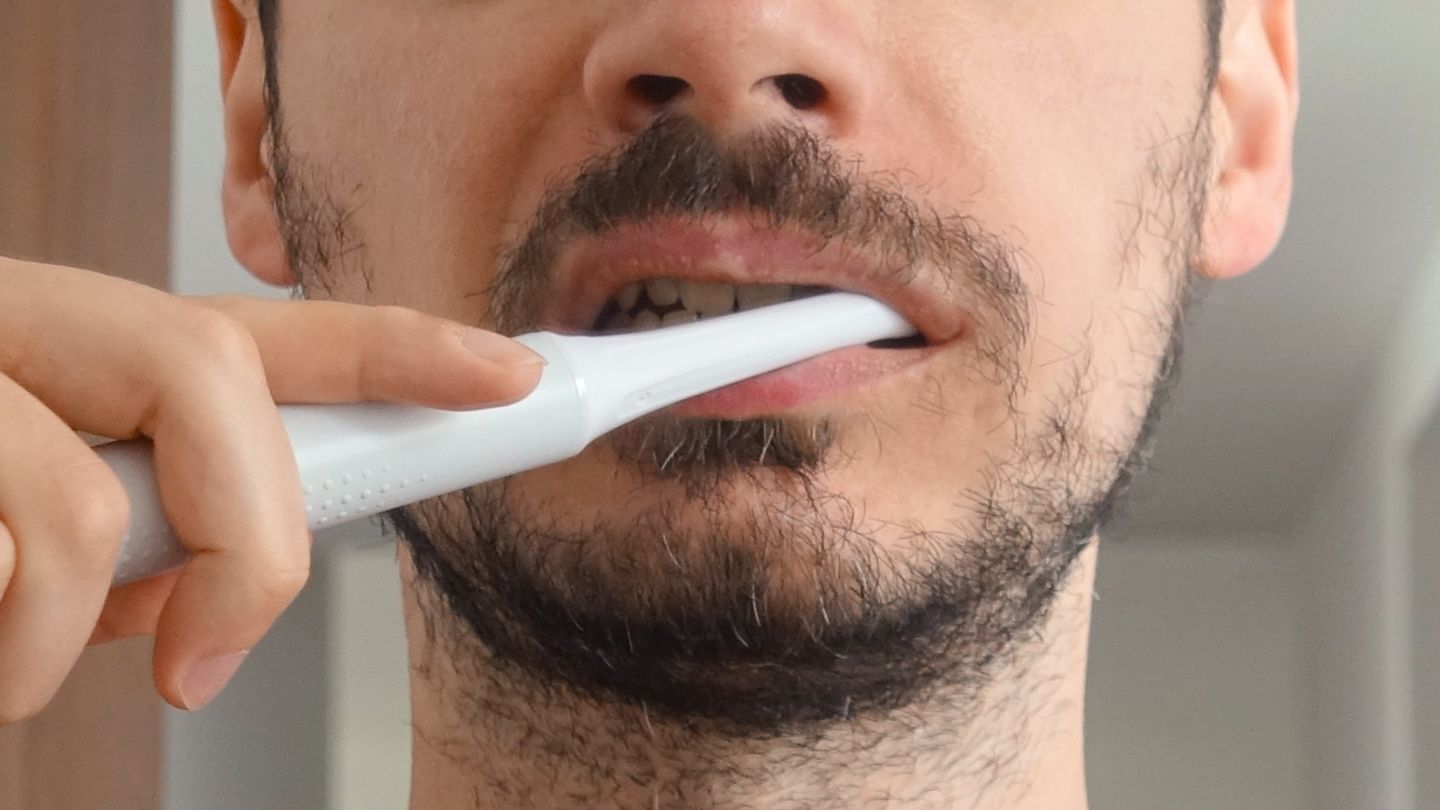
Homem escovando os dentes com uma escova de dentes elétrica branca. Foto cortada, do pescoço ao nariz.

The capitalist man has a tendency to complicate (and charge for) everything around him. Want to go running in 2026? Buy a pro running shoes, drink whey protein every day, sign up and pay to run with other people and receive a banana and a cheap tin medal at the finish line.

For a long time, I regarded the electric toothbrush as one of those low-return, almost useless advances, even though I had never used one. It didn’t help that, until a few years ago, it was an object I only saw in American movies and TV shows — the United States being one of the world leaders in inventing dispensable gadgets.

About a year ago, in mid-2025, I bought one. I don’t remember whether I was influenced by something I read (likely), only that the price seemed reasonable enough to give convenience a chance.

(more…)

The return of phones with physical keyboards?

Clicks, a US startup about to launch its first phone, told Mobile Time [pt_BR] that it is working to expand its presence in Latin America.

The message was delivered to the Brazilian publication by Clicks co-founder and CMO Jeff Gadway, who also said that “[we’ll have] more news to share in early 2027.”

The Clicks Communicator, the brand’s upcoming phone, can be used as a “companion” to your main phone or as your only phone. It has an interface built around text messaging, created in partnership with the folks at Niagara Launcher, and the form factor associated with phones from the late RIM, maker of the BlackBerry: a square screen on top and, below it, a small physical QWERTY keyboard.

Other fringe brands have also been betting on bringing the tiny keyboard back, such as Unihertz with the Titan 2 Elite and Minimal, which just released the Phone 2.

To be honest with you, I’ve never used one of these phones, either from the new batch or back in RIM’s heyday. That leaves me wondering whether there’s anything beyond pure nostalgia in this attempt to resurrect the format.

Back then, the advantage of a full keyboard was obvious compared with the alternative available: numeric keypads with T9 predictive text. Today, with smart virtual keyboards that predict your next words, or where you type by swiping a finger across the screen? I have my doubts.

This new batch also appeals to “minimalists” and people who want to use their phones less. The promise of the square screen, making some of today’s digital vices, especially vertical videos, awkward to indulge in, has some logic to it, but is it enough?

All three devices mentioned run Android, which means the door to addictive apps is always open. It’s well known that minor annoyances aren’t an effective barrier for someone who is hooked.

Also note that these phones are expensive. The Clicks Communicator is up for pre-order in the US for USD 649.

A better remedy might be to make your phone, whichever one it is, less fun and more utilitarian. The other day I came across this video that details some ideas for making your routine more fun than your phone. Those seem like more promising paths, and cheaper ones too.

Tiny Awards 2026 
tinyawards.net

The Tiny Awards 2026 results are in, a contest honoring the most creative website launched during the year. The winner was a familiar face here at Manual: the little multiplayer exploration game Cursor Camp, which I recommended back in May.

Blocking of unverified apps on Android starts in Brazil and other three countries

Google’s new arrangement for installing unverified apps on Android takes effect this Thursday (Oct. 1st) here in Brazil.

Indonesia, Singapore, and Thailand are also among the first countries to be affected.

F-Droid and other free and/or Google-independent initiatives have been raising a ruckus over the changes. They are, indeed, an extra hurdle for apps distributed without Google’s blessing. Verifying an app means identifying yourself to Google, which — understandably — many developers don’t want to do.

Heads-up! In July, Google announced that the first phase, running from now through 2027, will only affect apps distributed through specific stores: its own Play Store, Honor, Oppo, Samsung, Transsion, Vivo/Jovi, and Xiaomi. In other words, F-Droid got a breather until 2027. What a mess!

I covered the story [pt_BR] here at Manual before Google unveiled the so-called “advanced flow” for enabling the phone to install unverified apps. The flow, as per Google, works like this:

  • Enable developer mode in system settings. Activating this is simple. This prevents accidental triggers or “one-tap” bypasses often used in high-pressure scams.
  • Restart your phone and reauthenticate. This cuts off any remote access or active phone calls a scammer might be using to watch what you’re doing.
  • Come back after the protective waiting period and verify. There is a one-time, one-day wait and then you can confirm that this is really you who’s making this change with our biometric authentication (fingerprint or face unlock) or device PIN. Scammers rely on manufactured urgency, so this breaks their spell and gives you time to think.
  • Install apps. Once you confirm you understand the risks, you’re all set to install apps from unverified developers, with the option of enabling for 7 days or indefinitely. For safety, you’ll still see a warning that the app is from an unverified developer, but you can just tap “Install Anyway.”

I’ll play devil’s advocate here and say… this seems like a good measure? I know that in an ideal world (or for those who live and breathe tech) the phone is yours and you do whatever you want with it, but in the real world there are millions of elderly people, people with low literacy, teenagers, and people who simply have better things to do, all left at the mercy of scammers all day, every day.

It’s worth noting that this arrangement only applies to phones running Google-certified Android. On alternative systems without Google’s underpinnings, such as LineageOS (without microG), GrapheneOS, and HarmonyOS (Huawei’s), nothing changes.

For those who know what they’re doing, the “advanced flow” only needs to be done once. Its effects even carry over to new phones.

Coincidentally, the start of Android’s app verification coincides with Brazil’s ban on online gambling, enacted by the Lula administration through a provisional measure (an executive order with the force of law) last Friday (25th). The extra difficulty in installing unverified apps may help defend against illegal betting apps, as long as they aren’t verified with Google — which isn’t the case for operators that were licensed in the country.

Digital design bookshelves 
aresluna.org

This guy made a digital version of his library of physical design books. It’s an interactive photo; you can click/tap on a spine for more information about the book in question.

LLM AssBench 
assbench.com

The definitive test for generative AIs: which creates the most accurate ass. There are several models available and you can read the prompt. Don’t forget to also evaluate the reaction of the buttock to the pat. Tip from Renan, who refused to answer where the hell he found this.

AI in KDE Plasma

At the end of August, the results came out for a general resolution on the use of generative AI (LLMs) in Debian. Option 5 won: “Responsible use of generative AI.” The outcome — you can probably guess — left a lot of people unhappy.

This week, it was the KDE project’s turn to end up in the crossfire while trying to propose a policy on the use (or non-use) of AI in its code. Tempers flared when ~the internet discovered that one of the talks at Akademy, the project’s annual event, proposed “a lovable, sovereign, AI-native KDE,” pitched by two people who had been involved in KDE development in the past, but no longer are.

(more…)

Walking Men 
walking-men.com

Photographer Maya Barkai gathered dozens of depictions used at the green light of pedestrian traffic lights around the world and exhibited them outdoors in some cities in the early 2010s. She also made another collection with “men at work” images.

Gadgetbridge: A FOSS alternative to your fitness watch’s app

Putting a smart watch or band on your wrist means installing an app on your phone. That makes sense, given the tiny screens on these devices.
The problem is that these apps tend to do more than you’d expect. Huawei’s, for example, has a store for watch faces and AI-powered coaching and who knows what else it does behind the scenes. Apple’s (Fitness), one of the more low-key ones, reserves a prominent spot for the Fitness+ button, a paid subscription for access to recorded classes.

AI, by the way, has been spreading through the apps that pair with watches. (From here on, read “watches” as “watches and/or bands.”) The major companies in the industry have thrown their respective AIs into their health apps to make sense of the ton of data these watches collect and store on the phone. That they “hallucinate” seems to be treated as a mere detail — though it shouldn’t be.

There’s a way out (that I know of, at least) that doesn’t go through these official apps. And only if you have an Android phone. It’s Gadgetbridge.

(more…)

degr° 
degr.app

A screensaver that displays, in giant numbers, the temperature and/or the hour against a black background. There are 30  fonts to choose from, many combinations, and an option that moves the pixels a little bit once in a while to avoid to “burn” OLED screens. Free, for macOS and Windows.

This utility turns off the MacBook display when it connects to an external monitor

Add it to the list of trivial things macOS inexplicably can’t do: turn off the laptop display when it connects to an external monitor.

Until yesterday, what I did was use a utility — MonitorControl — to reduce the built-in display brightness to the minimum. It’s effectively off, but still active, meaning the mouse “wanders off” into the darkness and, depending on how the monitors are arranged, the Dock ends up hidden on the blacked-out display.

I happened to come across a tiny free app by Jeremy Kanter, suggestively named One Display, that turns off (really turns off) the built-in display as soon as the laptop is connected to an external screen.

To my surprise, it works!

There are only two options in One Display:

  1. Launch at login (Start at login).
  2. A keyboard shortcut to toggle the laptop display on and off. The default is Control + Command + B.

In an ideal world (or operating system), this functionality would be native. I know the KDE Plasma graphical environment does this. In macOS, to the dismay of people who prefer working with a single display, it apparently isn’t a priority.