Blocking of unverified apps on Android starts in Brazil and other three countries

Google’s new arrangement for installing unverified apps on Android takes effect this Thursday (Oct. 1st) here in Brazil.

Indonesia, Singapore, and Thailand are also among the first countries to be affected.

F-Droid and other free and/or Google-independent initiatives have been raising a ruckus over the changes. They are, indeed, an extra hurdle for apps distributed without Google’s blessing. Verifying an app means identifying yourself to Google, which — understandably — many developers don’t want to do.

Heads-up! In July, Google announced that the first phase, running from now through 2027, will only affect apps distributed through specific stores: its own Play Store, Honor, Oppo, Samsung, Transsion, Vivo/Jovi, and Xiaomi. In other words, F-Droid got a breather until 2027. What a mess!

I covered the story [pt_BR] here at Manual before Google unveiled the so-called “advanced flow” for enabling the phone to install unverified apps. The flow, as per Google, works like this:

  • Enable developer mode in system settings. Activating this is simple. This prevents accidental triggers or “one-tap” bypasses often used in high-pressure scams.
  • Restart your phone and reauthenticate. This cuts off any remote access or active phone calls a scammer might be using to watch what you’re doing.
  • Come back after the protective waiting period and verify. There is a one-time, one-day wait and then you can confirm that this is really you who’s making this change with our biometric authentication (fingerprint or face unlock) or device PIN. Scammers rely on manufactured urgency, so this breaks their spell and gives you time to think.
  • Install apps. Once you confirm you understand the risks, you’re all set to install apps from unverified developers, with the option of enabling for 7 days or indefinitely. For safety, you’ll still see a warning that the app is from an unverified developer, but you can just tap “Install Anyway.”

I’ll play devil’s advocate here and say… this seems like a good measure? I know that in an ideal world (or for those who live and breathe tech) the phone is yours and you do whatever you want with it, but in the real world there are millions of elderly people, people with low literacy, teenagers, and people who simply have better things to do, all left at the mercy of scammers all day, every day.

It’s worth noting that this arrangement only applies to phones running Google-certified Android. On alternative systems without Google’s underpinnings, such as LineageOS (without microG), GrapheneOS, and HarmonyOS (Huawei’s), nothing changes.

For those who know what they’re doing, the “advanced flow” only needs to be done once. Its effects even carry over to new phones.

Coincidentally, the start of Android’s app verification coincides with Brazil’s ban on online gambling, enacted by the Lula administration through a provisional measure (an executive order with the force of law) last Friday (25th). The extra difficulty in installing unverified apps may help defend against illegal betting apps, as long as they aren’t verified with Google — which isn’t the case for operators that were licensed in the country.
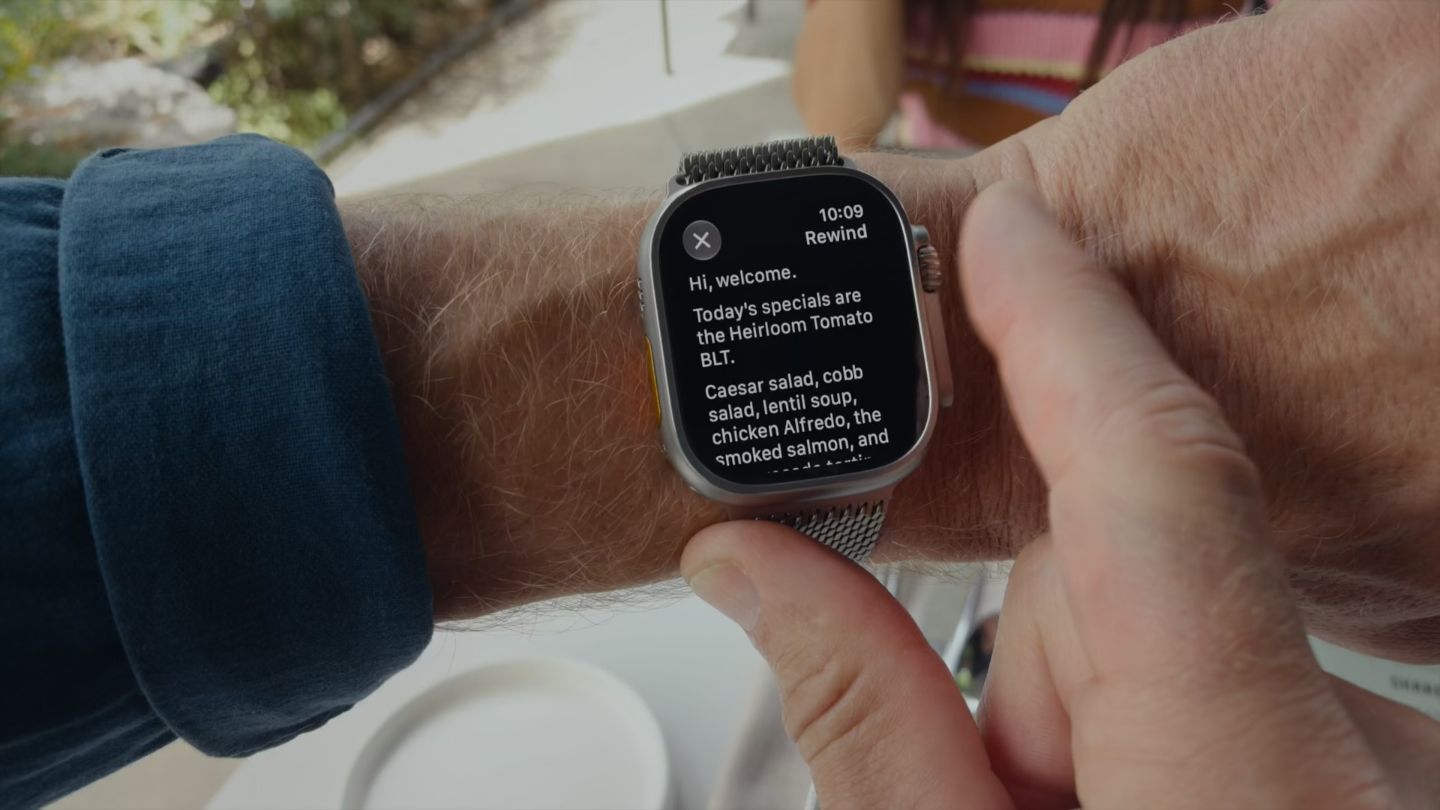
With Apple Watch that eavesdrops on conversations, what’s at stake is public perception

Foto de um Apple Watch Ultra 4 no braço de alguém, mostrando a transcrição de uma conversa recente captada pelo recurso Live Rewind.

I’ve published more than a couple of pieces on this blog trying to raise awareness about the risks of viral photo-editing apps, like FaceApp back in 2019 [pt_BR].

We are curious beings. The promise of looking into a magic mirror that shows us old, as a different gender, or in another era is nearly irresistible — a force that makes many people ignore the warning signs, even the obvious ones.

(more…)

I didn’t set a cookie 
kuber.studio

Despite the persistent nags to accept or decline tracking cookies on websites, the online surveillance industry already has more advanced techniques for monitoring your wanderings across the web. Collectively, this is called “fingerprinting”. This site shows everything a website can extract from you without needing cookies.

Four awful new privacy-eroding features from Meta in a month

This comment from Bruno, on Bluesky (pt_BR):

Instagram launches new tool that drains your entire bank account and kills your family. Here’s how to turn it off 👇

Instagram doesn’t (yet) do that. His joke references the recent news that photos from public Instagram profiles could be used to generate new images on WhatsApp with Meta AI, Meta’s generative AI, which also owns Instagram. The press picked it up and led with “Here’s how to turn it off” in the headlines.

(more…)

How AI chatbots manipulate you and undermine your privacy

At the risk of being among the first victims of artificial intelligence in a potential machine uprising, I keep my interactions with today’s generative AIs (or AI chatbots) strictly transactional.

I open the site, ask or request what I need, get the answer, close the site. No names, no pleases, no thank-yous, no small talk. I avoid anthropomorphizing them as much as possible. I treat them for what they are: statistical machines churning out words that make sense, not a new form of sentient life — at least, not yet.

Keeping a transactional relationship with AI chatbots is, for me, a way of keeping the line between us clearly drawn, to ward off an unlikely — but not impossible — “AI psychosis,” the kind of spiral where someone genuinely believes the AI is alive.

A newly published report by the Center for Democracy and Technology (CDT), authored by researchers Ruchika Joshi, Adinawa Adjagbodjou and Michal Luria, gave me further reasons to stand by that approach.

(more…)

The privacy screen on the Galaxy S26 Ultra

I had the chance to see the “privacy screen” that Samsung put on the Galaxy S26 Ultra in person at one of the brand’s stores. It has two levels of dimming, and at either level, the screen loses a lot of brightness for the person using the device (facing it; see this video), and although I wasn’t wearing glasses, I got the impression (and I wasn’t the only one) that the drop in resolution with the privacy screen enabled is noticeable (for some, even with it disabled).

For me, the significant emphasis Samsung places on a tangential feature supports a healthy trend I noticed years ago: phones became utilities, and buying one is now similar to buying a refrigerator.

End-to-end encryption for RCS on iOS 26.4

Confirming the rumors, the upcoming iOS 26.4 is expected to bring end-to-end encryption to messages exchanged between iPhone and Android using the RCS standard. There’s more: as this feature depends on a newer version of RCS, 3.0, other welcome additions are also expected to arrive: editing and deleting sent messages, reactions (tapback) without duplicating messages, and replying to specific messages.

You’re going to use Gemini on Android whether you like it or not

Google sent an email to Android phone owners warning that Gemini “will soon be able to help you use Phone, Messages, WhatsApp, and Utilities on your phone, whether your Gemini Apps Activity is on or off.” The change is scheduled for July 7th.

The notice generated confusion even in Android-focused publications. — 9to5Google, Android Police, Android Authority. Even after clarifications, including a statement from Google itself, the whole thing remains… confusing.

From what I understand, if Gemini Apps Activity is disabled, Gemini will continue to be available and have access to the mentioned apps, including WhatsApp and Phone. The difference is that interactions with the AI won’t be recorded in the history and will be stored by Google for up to 72 hours, with the guarantee that they won’t be used to train AIs or reviewed by humans.

(In other words, leaving history enabled subjects interactions to AI training and reviews by other humans.)

Those who *really* don’t want Gemini meddling with calls, messages, WhatsApp, and system settings need to disable integrations with each app within the Gemini app itself. Which seems to be another thing, different from Gemini Apps Activity. I presume it’s this app.

The aforementioned specialized publications, after updating their stories to “clear up the confusion,” concluded that the net result of the change is positive for people’s privacy. I’m not so sure about that. Confusions of this type, which sound intentional and try to hide the “nuclear” toggles (that disable the offered feature), tend to be defeats for privacy. And I won’t even get into the merits of whether Gemini snooping through my messages is good or bad.

Or maybe I still don’t understand it properly.

Related link (I think?): the extensive Gemini Apps privacy center.

Signal uses DRM to block Recall, the Windows 11’s built-in spyware

Signal has found a brilliant solution to shield its app from Recall, Microsoft’s official spyware for Windows 11: setting the app as protected by copyright (DRM), just like Netflix’s, which prevents it from appearing in screenshots — including those taken by Recall.

Recall, in case you’ve forgotten, is an “AI” feature that Microsoft announced in May 2024 for Copilot+ computers, which takes screenshots every few seconds and creates a searchable archive. Basically spyware. The launch was delayed due to public backlash, but testing resumed in April and it’s expected to arrive on eligible computers soon.